
 8 minute read
Introducing RumbleUp 3.0: Same Engine. Better Experience.
Built on years of client feedback and continuous platform growth, RumbleUp 3.0 delivers a faster, more intuitive experience with customizable dashboards, AI-powered tools, streamlined workflows and more.
Over the past six years, RumbleUp has evolved far beyond a simple texting platform. We have added over 50 new features - from compliance tools and conversation automation to advanced segmentation, Enhanced Video Texting and outsourced texting workflows.
As the platform grew, one thing became increasingly clear: the interface needed to evolve alongside it. What worked for a simpler platform was no longer enough for the breadth of tools and workflows available today.
RumbleUp 3.0 is the result. Built from the ground up and tested with real clients, it was designed to make the platform easier to navigate, easier to customize, and easier to build on for years to come.
If you missed our launch webinar, you can watch the recording below for a complete walkthrough of the new platform.
What Has Stayed the Same in RumbleUp 3.0?
Your projects, contacts, conversations, and workflows remain the same. The core of what makes RumbleUp work - how messages are sent, how replies flow and how delivery performance is tracked - has not changed.
What has changed is the experience around it. RumbleUp 3.0 introduces a modern interface, improved navigation, and a more intuitive way to interact with the platform every day. The engine you trust is the same. It is the experience around it that is better.
Here is a closer look at the improvements that make up the new RumbleUp 3.0 experience.
What's New in the RumbleUp 3.0 Dashboard?
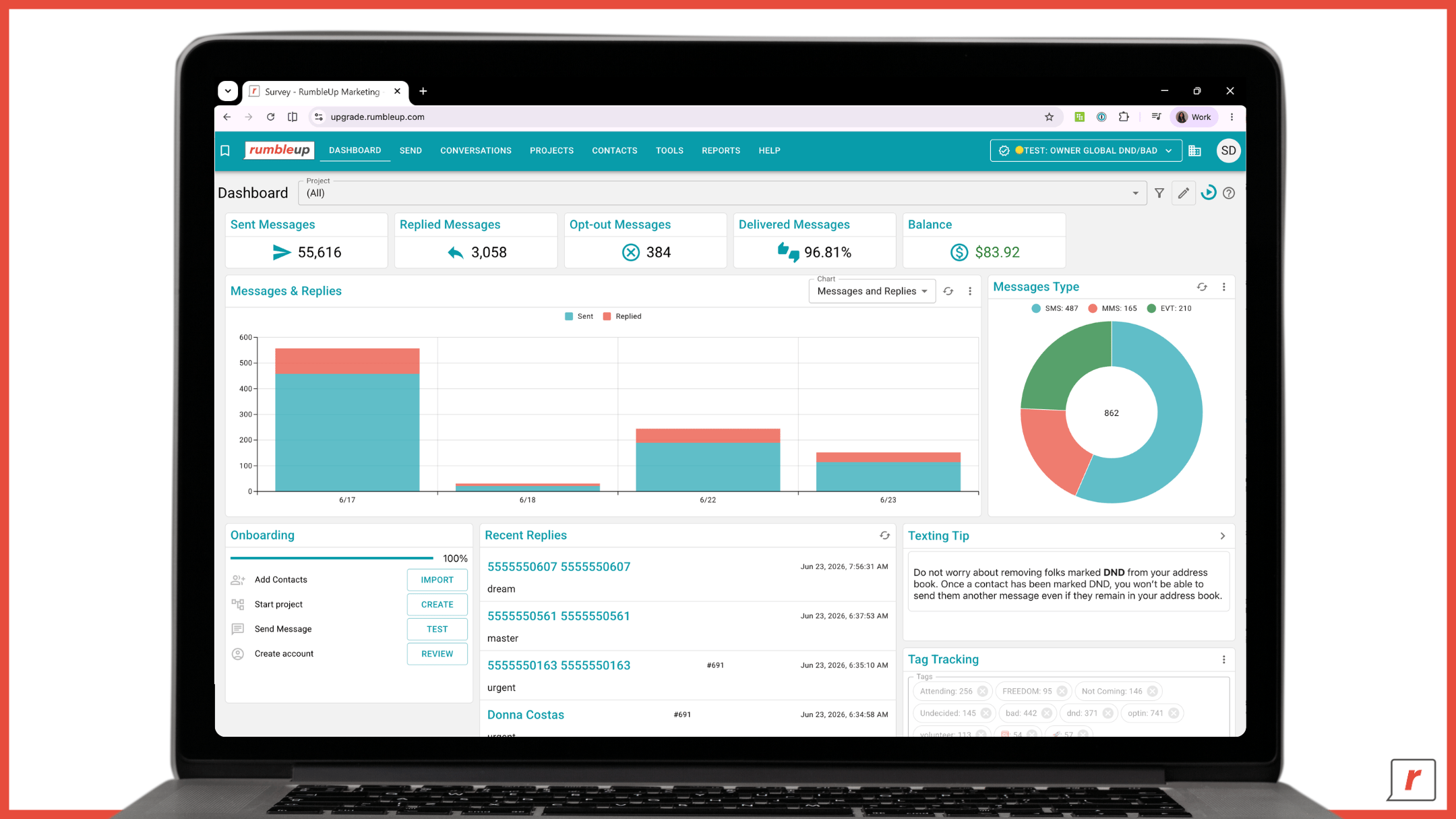
The new Dashboard is built around flexibility.
Every widget is fully customizable and unique to your profile, allowing each team member to build a dashboard that fits their workflow. Add, remove, rearrange, and resize widgets to highlight the metrics that matter most to you.
Whether you are tracking message activity, recent replies, delivery metrics, or channel performance, the dashboard adapts to your needs.
The biggest benefit of this new dashboard architecture is the flexibility. As we continue building new reporting metrics, we can add them much more quickly, and you as a user can decide what information is most valuable to you.
— Taite Gillis, Product Manager
For owner accounts, dedicated widgets provide visibility across all subaccounts in a single view, including billing summaries, project summaries, and delivery performance.
You can also filter individual widgets by project, making it easier to focus on the metrics that matter most to a specific campaign.
Coming soon: Date range filtering for dashboard widgets.
Navigation & Tools
The navigation has not changed. Your Conversations, Projects, and other commonly used pages are still right where you left them.
What is new is Bookmarks, a personalized shortcut section that gives you quick access to the tools you use most frequently. If you regularly use tools like URL Shortener or Conversation Automation, simply click the bookmark icon on the page and it will be added to your Bookmarks section for one-click access moving forward.
Bookmarks are unique to your profile, so you can customize your workspace around the tools that matter most to you without affecting anyone else's experience. As your workflow changes, you can easily add, remove, or reorder bookmarks from your profile settings.
💡 Feedback that shaped this: One of the most common requests we heard was a faster way to access frequently used tools. Bookmarks were built to solve exactly that problem. Rather than forcing every user into the same navigation experience, RumbleUp 3.0 lets you create a personalized shortcut layer tailored to how you work.
Notifications & Support
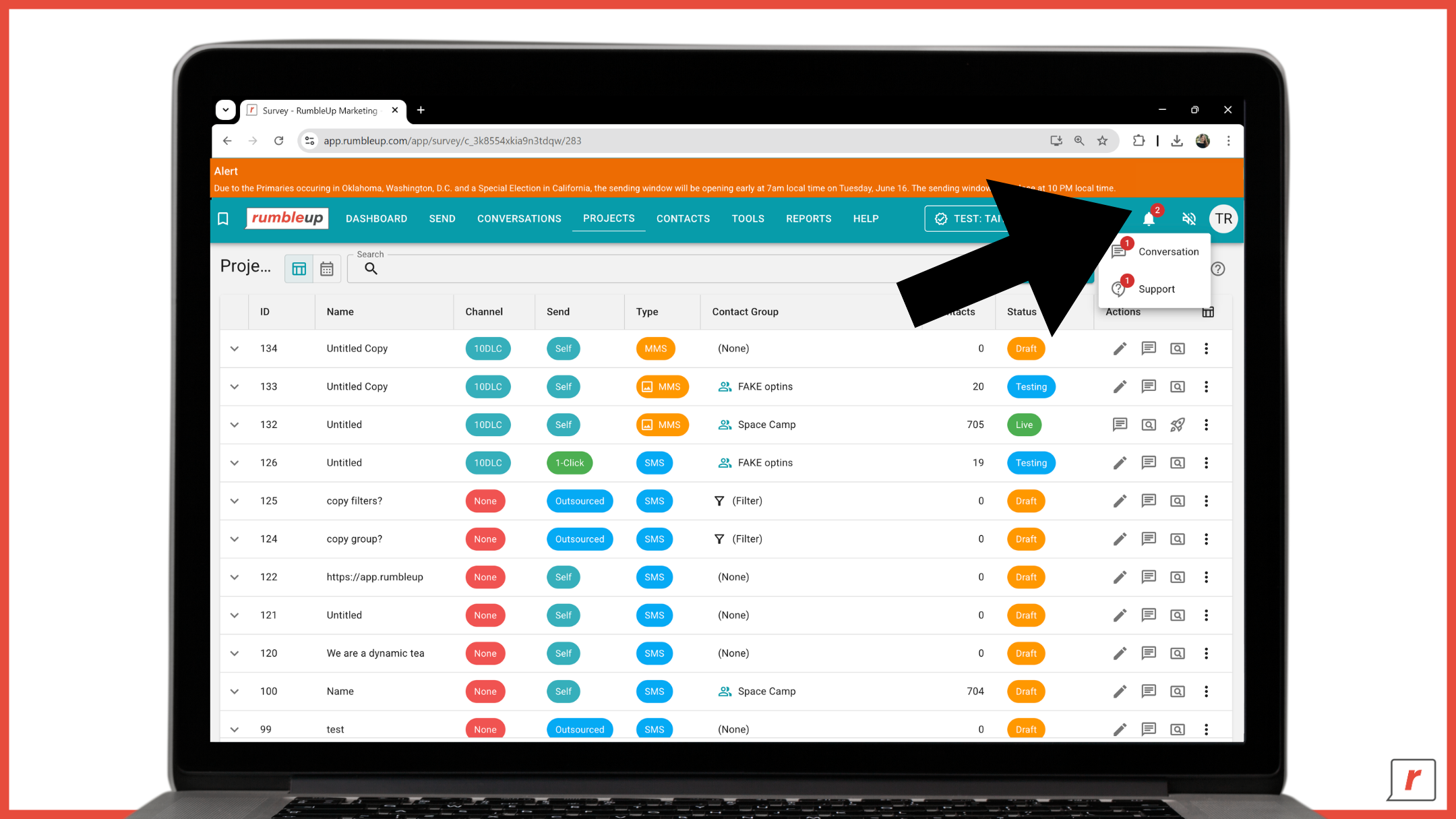
RumbleUp 3.0 introduces major improvements to notifications and support, helping you stay informed and get answers faster - especially on your busiest send days.
Smarter Alerts
The old banner notification system in 2.0 was too easy to miss, it only appeared on one page and could easily get lost in the middle of a busy workflow.
In 3.0, notifications have a dedicated home through the new notification bell in the top-right corner, making important updates easier to see and access.
You will receive two primary types of alerts:
-
System alerts that keep you informed about platform updates, important announcements, and time-sensitive changes such as extended sending windows on Election Day.
-
Delivery monitoring alerts that notify you of carrier or regional delivery delays in real time.
These delivery alerts become especially valuable during peak sending periods. When phone carriers experience unusually high traffic, delays can occur. Rather than wondering what is happening, you will receive an alert showing the affected carrier, the estimated delay window, and recommended next steps.
Audio Notifications
Want an extra nudge when something needs your attention?
RumbleUp 3.0 includes configurable notification sounds in your profile settings. Choose from a variety of options, including a classic chime, a high bell, and yes, even a meow.
You can assign sounds to different events, including:
-
Application Notifications
-
Import Finished
-
Message Response
-
Report Finished
-
Customer Support
Customize your alerts so you always know what needs your attention without constantly checking the screen.
Contextual Help
Finding help is now easier and faster.
Every page in RumbleUp 3.0 includes a help icon that opens documentation relevant to the page you are currently viewing. No need to leave your workflow or search through articles to find what you need.
Simply open the guide, find your answer, and get right back to work.
Help Center
For more in-depth resources, the full Help Center is still available through the Help menu.
With single sign-on, you will already be logged in when you arrive, making it easy to browse, search and access our complete library of documentation whenever you need it.
Contacts
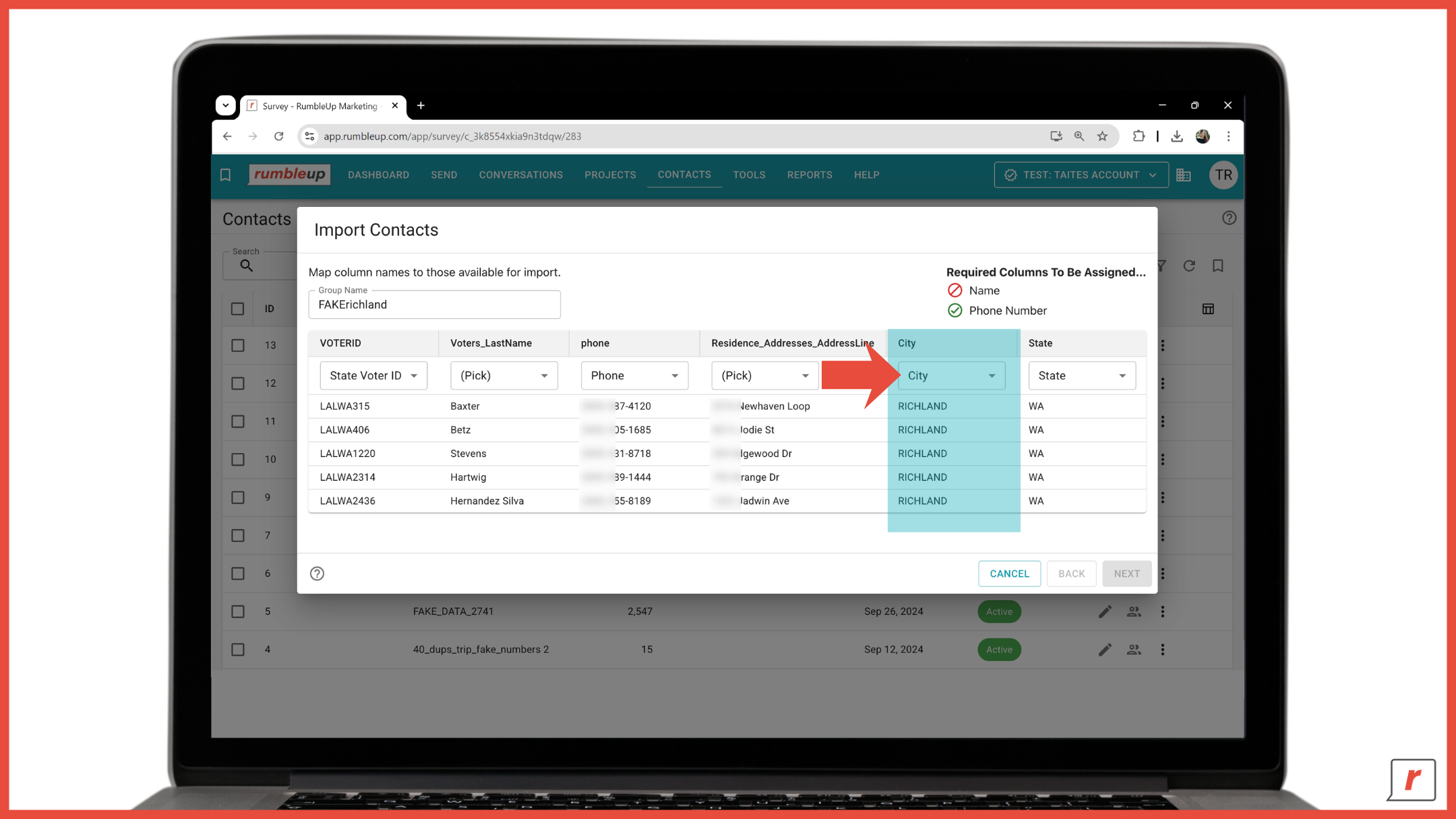
Importing contacts is now much faster in RumbleUp 3.0.
When you upload a new contact list, the platform now auto-maps any of your columns which match our contact fields. Fields such as state, city, voter ID, and others are recognized automatically, reducing the amount of manual setup required before import.
That does not mean you can skip the review step entirely. We still recommend taking a quick look to confirm everything mapped correctly and assigning any remaining unmapped columns. Any field left unmapped won't be imported, so a final review is always worth the extra few seconds.
The goal is not to remove you from the process, it is to eliminate the repetitive work. You stay in control while we handle most of the heavy lifting.
Project Setup & Overview
Project setup received the most significant overhaul in 3.0. Once you understand the logic behind it, the whole process becomes much faster and more intuitive.
Default Mode
Default Mode is designed to surface only the essentials needed to get a project out the door:
-
Outgoing number
-
Audience
-
Message (SMS or MMS)
-
Send type
It is clean, fast and streamlined for the majority of sends.
Advanced Mode
Advanced Mode is where the full toolkit lives. Simply toggle it on to unlock additional options, including: list filtering applied directly to the project without creating a new contact list, texter assignments, response and tag settings and more. If you used these features in 2.0 and could not find them right away in 3.0, this is exactly where they can be found.
💡Feedback that shaped this: One request we heard often was clearer access to advanced project settings. Our solution was simple: make them visible and clearly labeled, so the distinction between Default and Advanced Mode is obvious rather than hidden.
New Project Overview Page
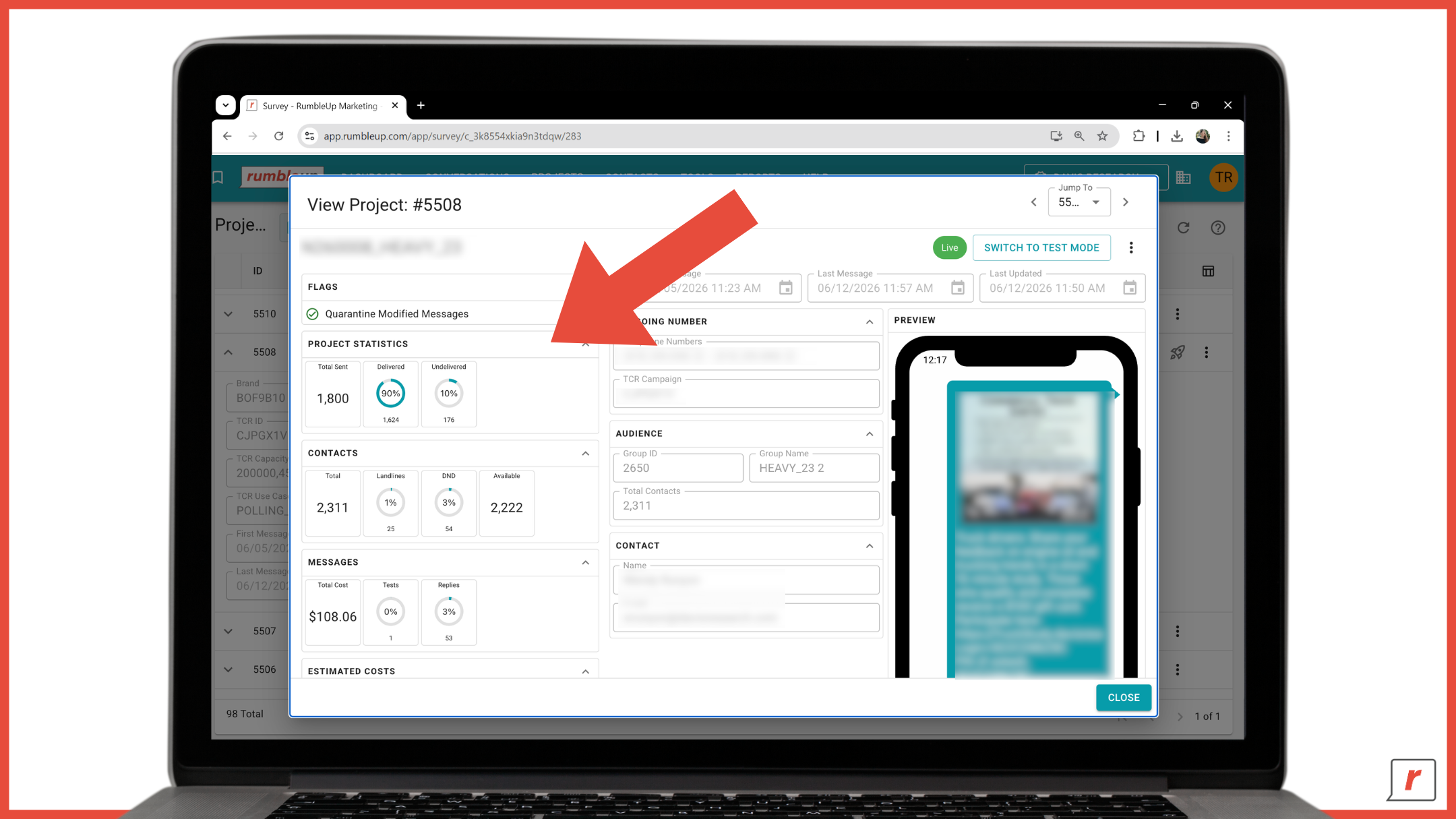
Before sending, you will now see a dedicated Project Overview page that brings all key information together in one place, including:
-
Outgoing number
-
Audience
-
Estimated cost
-
Send type
No more jumping between tabs to double-check project details before launch.
Test Mode
Testing projects is now more efficient. When sending a test message, you can save contacts to your personal testing library and assign them a name for future use.
Simply select saved contacts from the dropdown and send test messages to multiple numbers at once. You will also receive confirmation that a message is sent to each recipient.
It is a small change that makes a big difference for teams testing across multiple devices before a live send.
Projects Page
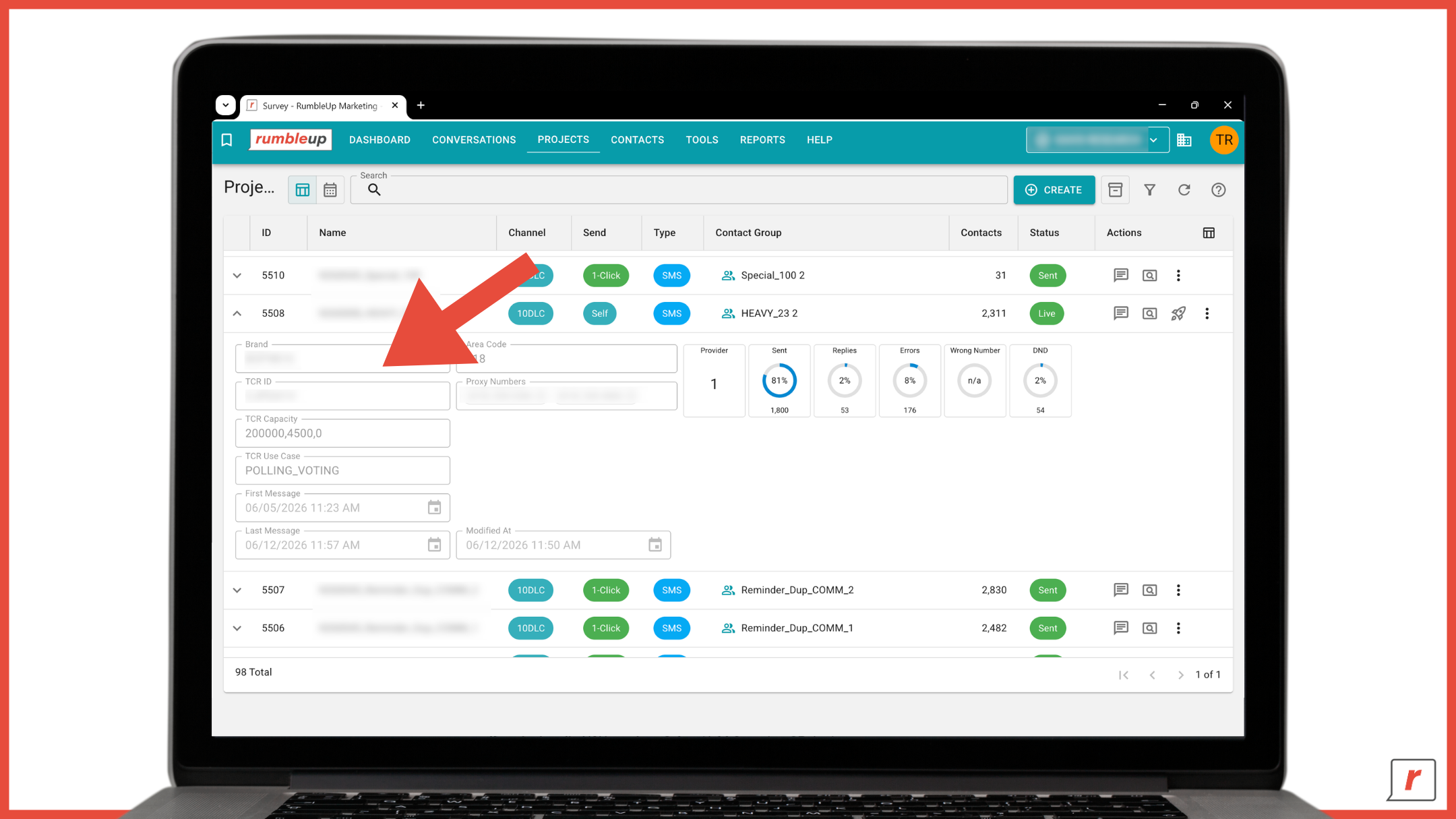
The Projects page is now more customizable than ever. You can choose which columns appear in your project list, including the new columns:
-
Channel type (10DLC, Short Code, Toll-Free)
-
Send type (Send Yourself, Outsource, 1-Click)
-
Message type (SMS, MMS, Enhanced Video Texting)
Add the information most relevant to your workflow and remove what is not. You can also view key performance statistics for each project directly from the listing page, making it easier to monitor results at a glance.
Sending from the Send Page
The Send page now has its own dedicated place in the main navigation alongside Conversations. All active projects are displayed in a dashboard view, making it easier to manage outbound sends in one location. Simply click Text Now on any project to launch your send.
Prefer working from the Projects page? You can send directly from there using our beloved spaceship icon 🚀.
Different entry points, same sending experience.
Conversations
The conversations page has two notable upgrades that make managing replies faster and more flexible.
Visual Send Indicators
Each conversation thread now shows a small icon telling you at a glance whether the last message was inbound or outbound. No need to expand the conversation to see where you stand. Together with the unread filter, the process of scanning your inbox during a live send becomes even faster.
Image Responses
You can now attach and send images directly from a conversation response without having to build a project - just drag and drop or browse for the file and send.
As a client, I cannot tell you how often I would have used this. I used to have to build a whole new project just to send a few people an attachment. I think this unlocks another superpower level in responding to your contacts.
— Amanda Pope, VP of Technology
Whether you are sharing a proof, following up with supporting materials or doing contrast messaging, it now only takes seconds.
AI-Powered Tools
RumbleUp 3.0 introduces three AI-powered tools designed to help you work faster across some of the most time-consuming parts of your workflow: drafting messages, responding to contacts, and building segmented audiences.
Important: These features are not enabled by default. To activate them, submit a ticket to our support team.
AI-Assisted Message Drafting
When creating a project in Advanced Mode, you can define your objective in plain language by describing the goal, audience, and context of your campaign. Click Draft Message and a suggested message will be generated for you. If you have used our AI Assist before, this will feel familiar. RumbleUp 3.0 expands on our first-generation AI Assist by giving you more context, more control and better tools for generating high-quality message drafts.
The quality of the output depends on the quality of the input. For best results, include details about your audience, call to action, tone, relevant materials about your initiative/organization, and any relevant context.
As someone who has spent years building messaging programs, I would have loved the ability to upload all of my campaign materials - mailers, door hangers, scripts, and other messaging documents - so that AI could better understand the campaign and generate more robust message drafts and subsequent responses. The more context you can give the AI, the more valuable it becomes.
— Amanda Pope, VP of Technology
Need help refining your prompt? The built-in assistant can expand your objective, adjust its length, or improve grammar and spelling before generating a draft.
AI-Assisted Response Drafting
In the Conversations view, Agent Response generates a suggested response when a contact replies to your message.
The draft is created using three sources of information:
- Your project objective
- The contact's conversation history
- Any available contact details
This feature is designed to assist, not automate. Every response must be reviewed and can be edited before sending, keeping your team in control of the conversation.
The biggest benefit comes during high-volume, two-way texting campaigns where timely responses matter. Think of it as a smart first draft that helps you move faster while maintaining a human touch.
AI Segmentation Rules
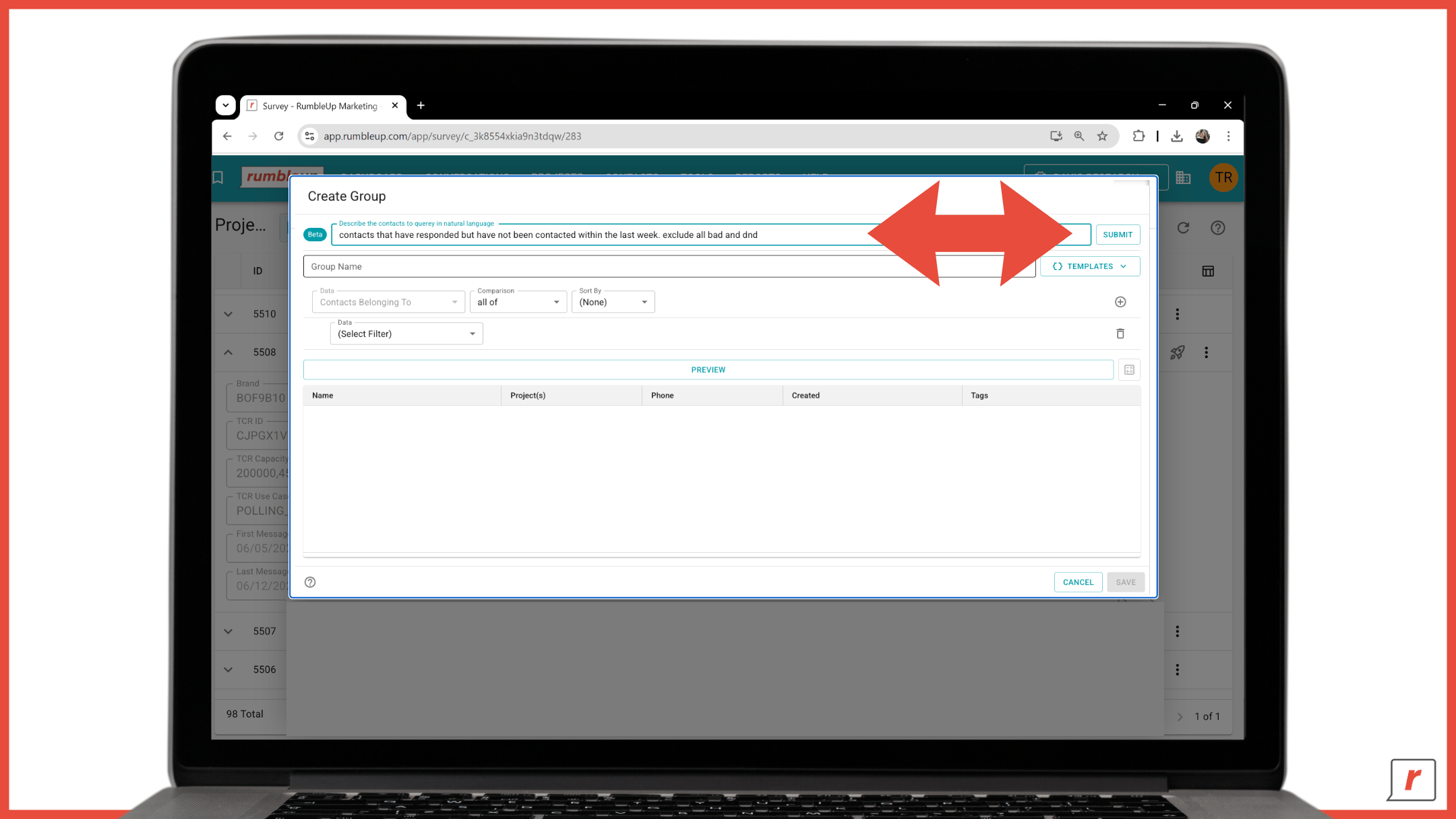
Creating segmented audiences no longer requires building filter rules manually.
Simply describe the audience you want in plain language, and the platform will generate the appropriate segmentation rules for you - as long as the necessary data exists in your contact records.
Before saving, you can review the generated filters and preview the audience to ensure everything looks right. What once took multiple steps can now start with a single sentence.
📥 Download: RumbleUp 3.0 Explanation Guide
Looking for a quick reference as you transition to RumbleUp 3.0?
Download our guide for feature highlights, key rollout dates, access instructions, support and feedback resources, frequently asked questions, and a firsthand testimonial from an early user of the new portal.
Bottom Line
RumbleUp 3.0 is more than a redesign - it is the foundation for what is next.
Built to support faster innovation, greater scalability and a more intuitive user experience, 3.0 gives you the tools you need today while creating room for everything we are planning tomorrow.
If you have been with us for years, now is the time to jump into 3.0, explore the new experience, and get comfortable with its capabilities ahead of the August 3rd transition. If you have been considering RumbleUp, there has never been a better time to get started.
We will continue evolving the platform and delivering new improvements based on client feedback in the months ahead.
👉 Ready to get started? Access RumbleUp 3.0 | Book a walkthrough with our team
 9 minute read

.png)